Software for architecture offices
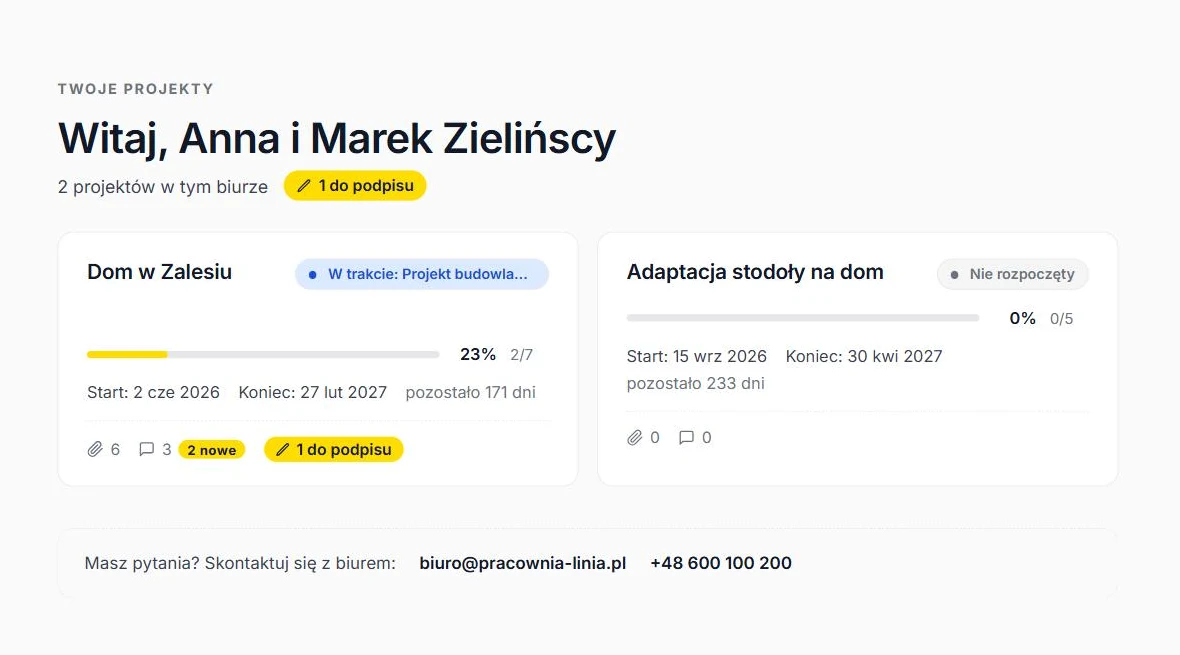
An office handles several things with each client at once: project stages, files, approvals, the contract, the power of attorney and applications to the authorities. Usually this lives in email, on a drive and in Excel, and the client calls to ask which stage the project is at. ArchiFlow puts it in one office panel and one client portal.
What an office needs from its software
Seven things that come back in every project, and how ArchiFlow handles them.
| Office need | In ArchiFlow |
|---|---|
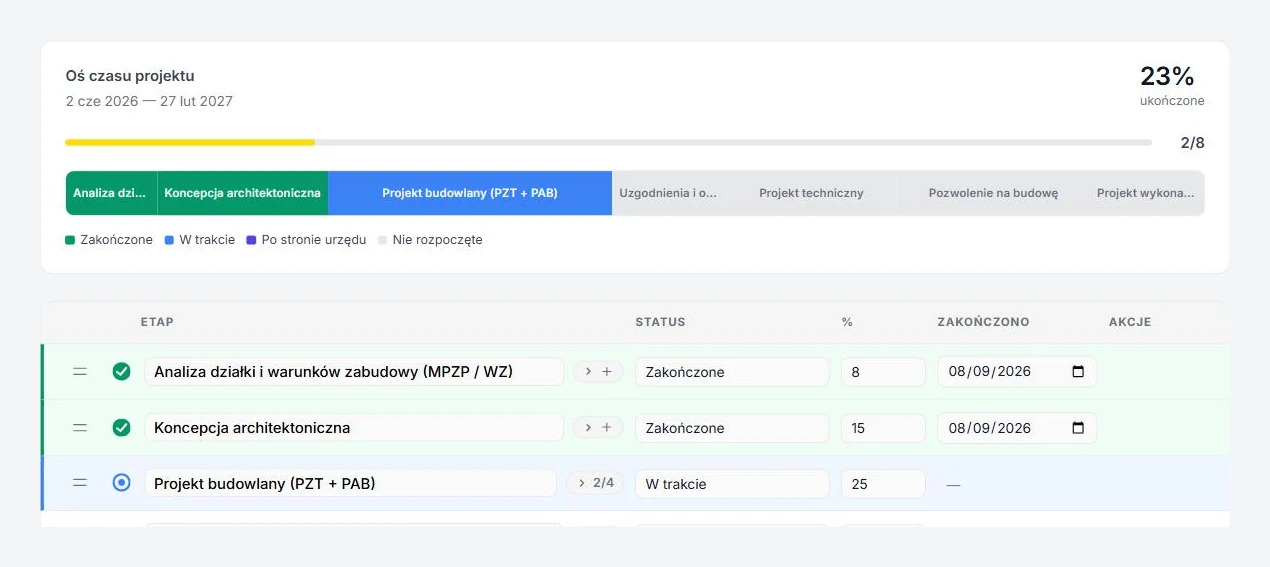
| The client knows which stage the project is at | A client portal with a stage timeline and progress percentage. The client enters with one link and sets up an account only if they want to. See |
| Files in one place, no copying | The project folder on the office's Google Drive or Dropbox, files assigned to stages. The client downloads them from the portal. See |
| A contract signed without printing or post | Signature with the Polish trusted profile on gov.pl. Several signatures in one PDF, the file goes back to the project folder. See |
| Applications to the authorities without retyping data | PB-1, PB-5, power of attorney, reply to a summons and driveway permit application from office, investor and plot data. DOCX and PDF. See |
| Client conversations next to the project, not in the inbox | A discussion thread in every project. The client gets an email about a new message and a completed stage. See |
| The same process in every project | Eight ready-made stage sets: single-family house, adaptation, multi-family, commercial, interiors, extension, legalisation, change of use. See |
| Several people on the team | Architects run projects, the office admin manages templates and users. Sign in with a password or a Google account. See |
Which offices it fits
One-person studios and large teams that design single-family houses, multi-family and commercial buildings, interiors, adaptations, extensions and legalisations in Poland.
A studio of up to five people can stay on the Free plan: 50 active projects, the client portal, unlimited e-signatures and Drive or Dropbox integration. Teams of up to ten pick Studio (99 PLN/mo, 100 projects), larger ones Office (249 PLN/mo, no limits). Pricing
ArchiFlow next to Trello, Excel and a CRM
Most practices run projects on a task board or in a spreadsheet with folders on a drive. Both work until the client and the planning office get involved.
| Task board (Trello, Asana) | Excel and a drive | ArchiFlow | |
|---|---|---|---|
| What the client sees | An invite to the team board, or nothing | An email with a screenshot or a link to a folder | A client portal with stages, files and discussion, opened with one link |
| Project stages | Lists and cards, every team invents its own | Columns and colours, copied between projects | Eight ready stage sets per investment type, with progress shares |
| Project files | Attachments on a card or a link to a drive | Folders on a drive, naming kept by hand | A folder on the office's Drive or Dropbox, files attached to stages |
| Contract and signatures | A separate tool | Print, sign, scan | Trusted-profile signature, several people in one PDF |
| Applications to authorities | Outside the tool | Forms filled in by hand on every project | PB-1, PB-5, power of attorney and letters from project data |
| Sales pipeline and invoices | Yes, in CRMs and sales boards | Yes, if somebody keeps it | No — from contract to handover; accounting stays in your accounting software |
A task board stays good for team work and a spreadsheet for cost estimates. ArchiFlow takes over what happens between the office, the client and the authority. See typical situations
What ArchiFlow does not do
You keep doing these in other software.
Drawings and models
ArchiFlow is not CAD or BIM software and does not replace ArchiCAD or Revit. You save exports in the project folder and the client sees them at the right stage.
Accounting and invoices
You issue invoices in your accounting software. ArchiFlow does not handle billing.
Sales and quotes
There is no sales pipeline or quoting. ArchiFlow starts with the client contract and runs the project until handover.
Questions about office software
Which project management software should an architecture office choose?
Is ArchiFlow a CRM for architects?
What size of office is ArchiFlow for?
How long does setup take?
Will ArchiFlow replace Excel and folders on a drive?
Do my files stay with me?
Your first project
in fifteen minutes.
Create an account, add a project and send the client a link. No card needed.